Sharing SwiftData With an iOS Widget: I Researched Both Options, Picked the Safe One, Then Needed Both
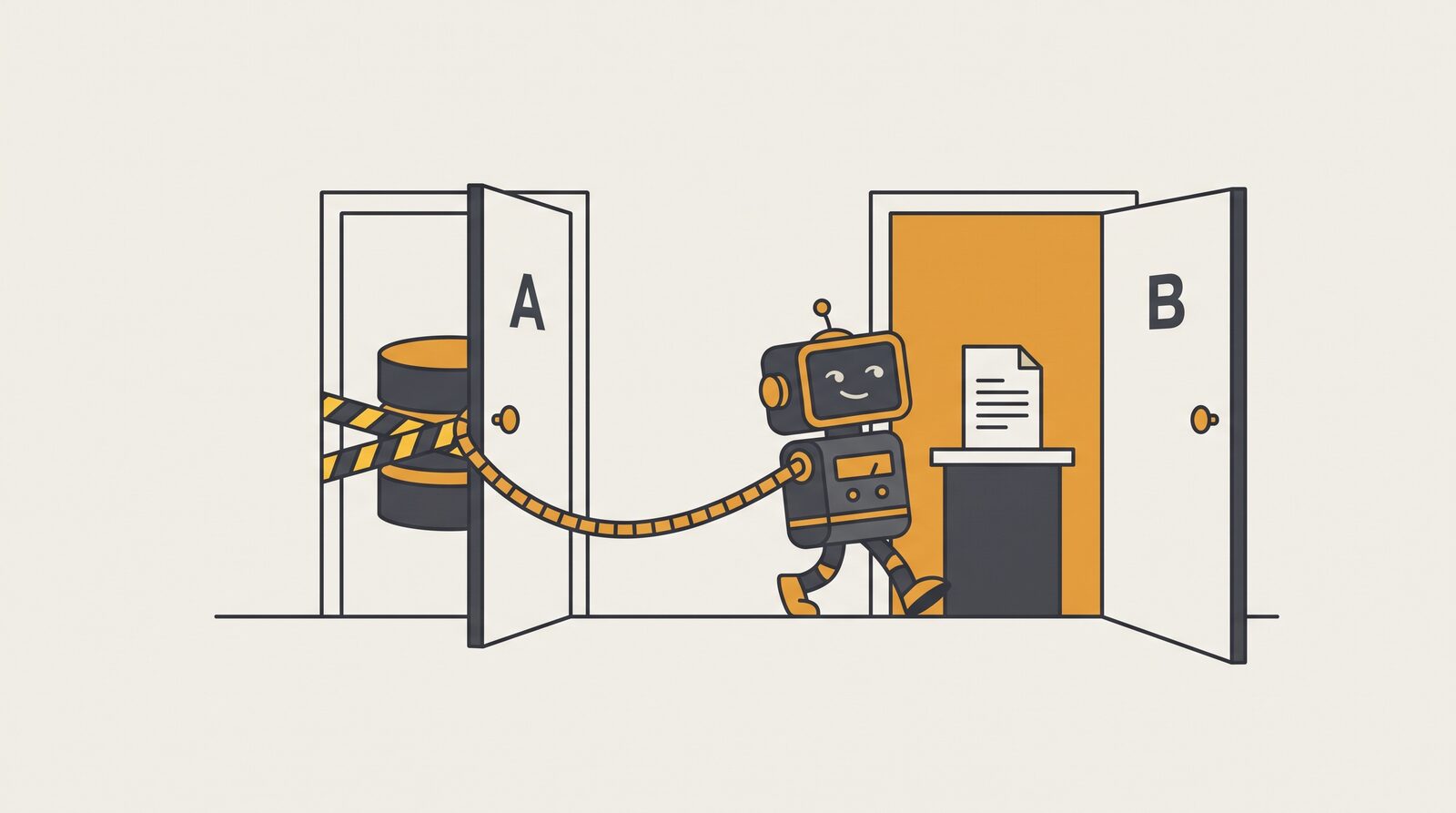
A WidgetKit widget runs in a separate process and sees none of your app's data. Apple documents two ways to bridge that gap — and endorses neither. Here's the comparison I wish I'd found, plus the plot twist that made me use both.
I've been building QuestKeeper, a small native iOS side project: a gamified to-do app where every task is a monster in a dungeon and missing a deadline kills your pixel hero. (Yes, I now do the dishes to keep a fictional character alive. It works disturbingly well.)
Naturally, it needed a Home Screen widget — the dungeon, visible without opening the app. "Just add a widget target," I thought. Then I learned what every widget developer learns on day one: the widget is not your app.
The Problem: Two Processes, One Truth
A WidgetKit extension runs in its own process.
It cannot see your app's in-memory state, your @Query results, or your ModelContainer.
The only shared ground Apple gives you is an App Group container — a directory both processes can access via FileManager.containerURL(forSecurityApplicationGroupIdentifier:).
What you put in that container is up to you, and Apple genuinely does not pick a side. The WidgetKit guidance says only that you "can use something like a shared database or user defaults." That's it. That's the guidance.
So for a widget that renders SwiftData-backed content, you have two real architectures:
- Approach A — share the live SwiftData store. Root the SQLite store in the App Group via
ModelConfiguration(groupContainer: .identifier("group.…"))(iOS 17+), and have the widget open its ownModelContaineragainst the same file. - Approach B — write a JSON snapshot. The app serializes a small
Codablepayload into the App Group container; the widget only ever decodes that file.
Approach A sounds obviously right — one store, one source of truth, no second serialization. I assumed I'd pick A. Then I did a proper research pass through Apple's docs and Developer Forums, and A started collecting hazards.
Round 1: The Case Against Sharing the Live Store
Five documented pitfalls, several confirmed by Apple DTS engineers on the forums:
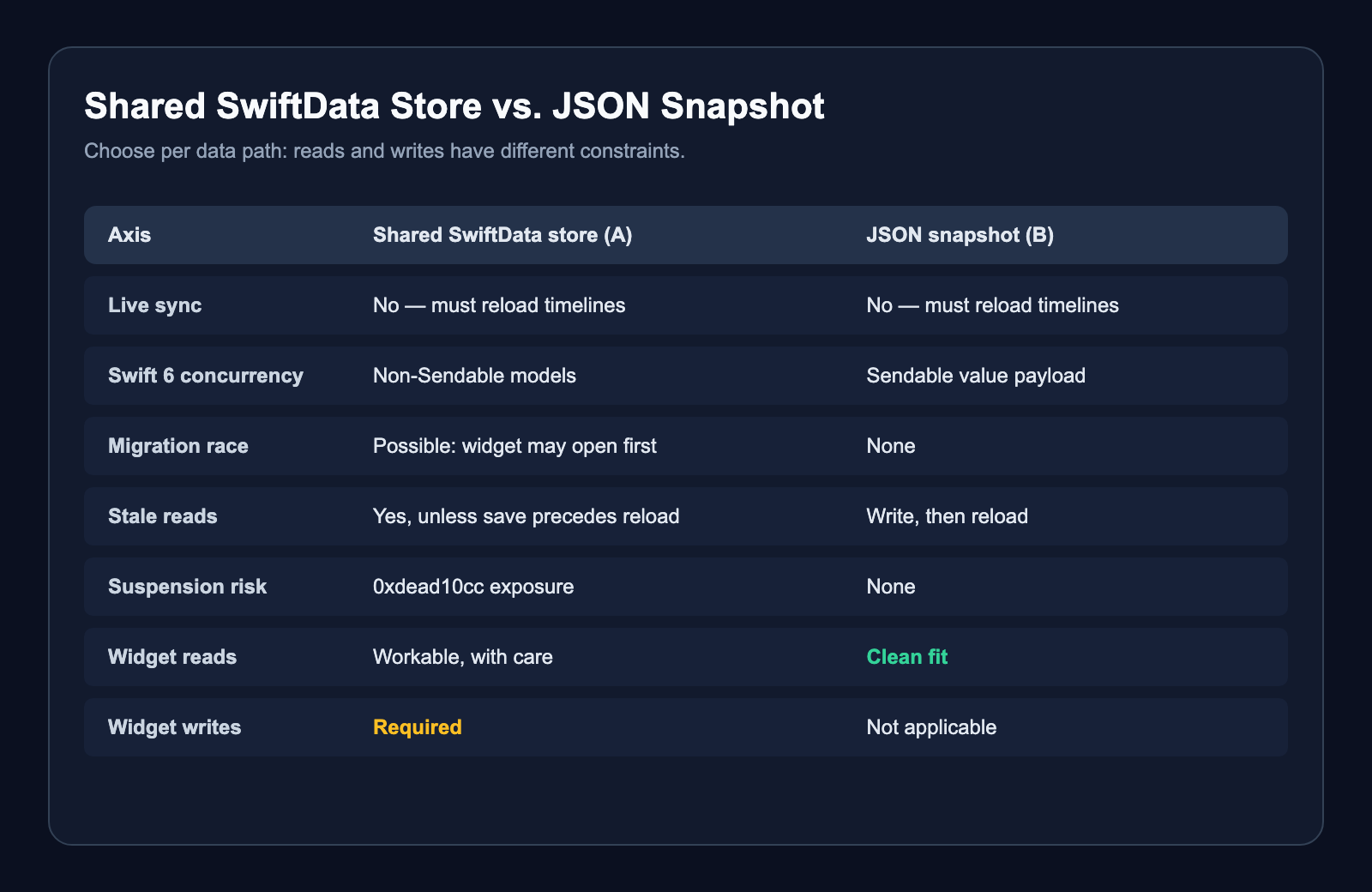
1. Silent store relocation. If you don't set an explicit store URL, SwiftData inspects your entitlements — and if it finds an App Group, it silently uses the group container as the store's parent folder. Translation: merely adding the App Group entitlement for your new widget can move your existing users' database, no code change required. This is a documented data-loss trigger (forum thread 789173, answered by Apple DTS).
2. The migration race. The widget process can create or open the shared store before your app has run its schema migration (thread 756615). Your widget wins a race you didn't know you'd entered.
3. Stale cross-process reads.
Mutating the ModelContext and then calling WidgetCenter.shared.reloadAllTimelines() can still serve old data: unsaved in-memory changes are invisible to another process reading the on-disk store.
You must call modelContext.save() before reloading — autosave gives no guarantee it has flushed by then (thread 760621).
4. Swift 6 concurrency friction.
A SwiftData model instance is not Sendable and cannot cross actor boundaries; only its persistentModelID can, with a re-fetch on the other side (thread 805409, Apple DTS).
Every place your widget code touches a live model, the compiler has opinions.
5. Suspension and 0xdead10cc.
Holding a file lock on a shared container across process suspension is the classic 0xdead10cc termination (TN2408).
A live SQLite store shared between an app and an extension keeps that risk permanently on the table.
And here's the kicker that undermines Approach A's main selling point: sharing the store does not give you live updates anyway.
In both approaches the widget never observes changes; the app must explicitly call WidgetCenter.shared.reloadTimelines(ofKind:).
A shared database buys you the hazards without buying you reactivity.
Round 2: Shipping the Snapshot
For a read-only widget, Approach B sidesteps all five hazards.
No shared store, no migration race, no cross-process SQLite, no lock held at suspension.
The snapshot is a plain Sendable value:
nonisolated struct WidgetDungeonPayload: Codable, Sendable, Equatable {
    static let currentSchemaVersion = 1

    let schemaVersion: Int
    let generatedAt: Date
    let quests: [WidgetQuestPayload]
}

nonisolated struct WidgetQuestPayload: Codable, Sendable, Identifiable, Equatable {
    let id: UUID
    let title: String
    let deadline: Date
    let completedAt: Date?
    let importanceRawValue: Int
}
Notice what's not in the payload: no hero HP, no monster levels, no isDead flag.
QuestKeeper follows a strict "persist facts only, derive state" rule — the snapshot carries immutable facts (deadline, completedAt, importance), and the widget's TimelineProvider derives the game state at render time against the current clock.
A snapshot written at 9 AM still renders a correct dungeon at 3 PM, because deadlines don't change after the fact; only the derivation does.
The reader is deliberately paranoid — wrong schema version or any decode failure degrades to an empty dungeon rather than a crashed widget:
func load() -> WidgetDungeonPayload {
    guard let fileURL else { return .empty }

    do {
        let data = try Data(contentsOf: fileURL)
        let payload = try JSONDecoder.widgetDungeon.decode(WidgetDungeonPayload.self, from: data)
        guard payload.schemaVersion == WidgetDungeonPayload.currentSchemaVersion else {
            return .empty
        }
        return payload
    } catch {
        return .empty
    }
}
On the writing side, the app funnels every update through an actor that coalesces bursts, retries the file write, and — echoing hazard #3 — only reloads timelines after the snapshot is confirmed on disk. Reloading first and writing second would reproduce the exact stale-read bug I was avoiding, just with a JSON file instead of SQLite.
Clean architecture, hazards dodged, blog post practically writing itself. This worked beautifully — until I added one button.
Round 3: The Tap That Broke the Purity
Interactive widgets let you complete a quest with one tap, straight from the Home Screen. Obviously I wanted that. An app whose entire premise is fighting procrastination should not require opening the app to check off a task.
But an interactive widget's AppIntent executes in the widget extension process.
And completing a quest means writing — persisting a completedAt fact into the SwiftData store.
The store that lives… in the app.
The store I had specifically architected the widget to never touch.
There is no way around it: if the widget must write, the widget must open the shared store. Approach A walks back in through the front door.
So QuestKeeper's final architecture is a hybrid:
- Display path (read): Approach B. The
TimelineProvideronly ever reads the JSON snapshot. - Tap path (write): Approach A. The intent opens the shared SwiftData store, writes exactly one fact, rewrites the snapshot, and reloads.
Inviting Approach A back means facing its hazards deliberately. Hazard #1 (silent relocation) is neutralized by making the store address explicit and deterministic — both targets open this container, never an implicit default path:
enum QuestModelContainer {
    nonisolated static func make() throws -> ModelContainer {
        let schema = Schema([Quest.self])
        let configuration = ModelConfiguration(
            schema: schema,
            groupContainer: .identifier("group.kr.donminzzi.QuestKeeper")
        )
        return try ModelContainer(for: schema, configurations: [configuration])
    }
}
The intent itself is short-lived and idempotent — it commits the raw fact, cancels the quest's pending notifications, then rewrites the snapshot the timeline reads:
func perform() async throws -> some IntentResult {
    guard let id = UUID(uuidString: questID) else { return .result() }

    let container = try QuestModelContainer.make()
    let store = QuestStoreActor(modelContainer: container)

    let wrote = try await store.complete(id: id, now: .now)
    guard wrote else { return .result() } // already completed / missing — nothing else to do

    // …cancel notifications, rewrite the snapshot, reload…
}
A stale double-tap is a no-op. If the snapshot rewrite fails, the committed fact still wins: the app's next foreground pass rewrites the snapshot anyway, so the widget is eventually consistent instead of wrong. And the write transaction is over in milliseconds — no lock held anywhere near a suspension boundary.
Round 4: What the Comparison Actually Taught Me
The question I started with — "shared SwiftData store or JSON snapshot?" — turned out to be framed wrong. It's not one decision. It's two:
Lessons Learned
- Route the decision per data path, not per app. My read path and write path picked different architectures, and that's not a compromise — it's the correct answer to two different questions.
- "Shared database = live widget" is a myth. Neither approach updates the widget by itself;
WidgetCenterreload is always the only trigger. Once you internalize that, Approach A loses most of its glamour for read-only rendering. - Snapshot facts, not derived state. Because the payload carries only immutable facts and the widget derives state at render time, a stale snapshot degrades gracefully instead of lying.
- If you must share the store, share it explicitly. An explicit
groupContaineridentifier in one shared factory function is the difference between "deterministic store address" and "SwiftData moved my database because I added an entitlement." - Order your writes. Snapshot on disk first, then reload. The stale-read hazard doesn't care whether your storage is SQLite or JSON.
One honest caveat: whether SwiftData's default SQLite journal mode is WAL (which determines how directly TN2408's suspension-kill scenario applies) is something I couldn't confirm from primary sources. If you have an authoritative reference, I'd genuinely love to see it.
Is your widget read-only? Are you sure? Mine was too — for exactly one day, according to git.
References
- Apple Developer Forums, thread 789173 — SwiftData default store relocation when an App Group entitlement is added (Apple DTS answer)
- Apple Developer Forums, thread 756615 — widget extensions may create an App Group store before the app's migration runs
- Apple Developer Forums, thread 760621 — stale widget reads without
modelContext.save()before reload - Apple Developer Forums, thread 805409 — SwiftData models are not
Sendable; passpersistentModelIDacross actors (Apple DTS answer) - Apple Technical Note TN2408 — shared-container file locks and the
0xdead10cctermination
Get the next post.
If you made it to the end, meet the next post in your inbox or RSS reader.